Fado Engine
"Fado Engine" is a data-oriented custom 2D/3D game engine written in C-Style C++ using Direct3D 11 as the graphics library.
Project Layout
FadoEngine/
├── Engine/                        # The Engine project. Builds to FadoEngine.exe
│   ├── Code/                      # Engine + renderer source (fado_*.h/.cpp)
│   ├── Shaders/                   # HLSL shaders (material, particle, UI)
│   ├── Assets/                    # Cooked, engine-ready assets (.fimage, .fmodel, .ffont, .fsound)
│   ├── AssetsSource/              # Original source assets (.png, .glb, .wav, .ttf) before cooking
│   ├── Tools/FadoConverter/       # Standalone tool that cooks source assets into .f* formats
│   └── ThirdParty/                # imgui, lz4, stb_image, stb_truetype, stb_dxt
│
├── Game/                          # The Game project. Builds to Game.dll
│   └── Code/
│       ├── fado.cpp / fado.h      # Game <-> engine connector layer, UI helpers
│       ├── fado_level.h           # Level struct, load/save/spawn logic
│       ├── fado_input.h           # Input structs (keyboard, mouse, controllers)
│       ├── fado_collision.cpp     # Collision detection implementation
│       └── Levels/                # Individual level headers (2D/3D showcases, etc.)
│
├── premake5.lua                   # Generates the Visual Studio solution
├── premake5.exe                   # Required for the .sln generation
└── fado_build.bat                 # Runs premake5 to (re)generate the .sln
| Project | Kind | Contains |
|---|---|---|
| Engine | .exe |
Win32 platform layer, DX11 renderer, asset loaders |
| Game | .dll |
Game update logic, levels, collision, input handling |
Build System
Fado uses premake5 rather than a hand-written Visual Studio solution.
A simple one .bat file.
fado_build.bat -> runs premake5.exe vs2026 -> generates FadoEngine.slnpremake5.lua defines both projects:
- Engine (WindowedApp):
compiles everything under Engine/Code, the shader sources, and all ThirdParty code. A post-build step copies Assets/ and Shaders/ next to the built .exe so it's runnable standalone.
-
Game (SharedLib):
compiles Game/Code into Game.dll, defining GAME_DLL so shared headers (like the logger) know which build they're in.
Both projects share the same Debug/Release configuration split,
and both are built into the same output directory so the .exe can find and hot-reload the
.dll at runtime.
Architecture Overview
The engine is made of three primary layers:
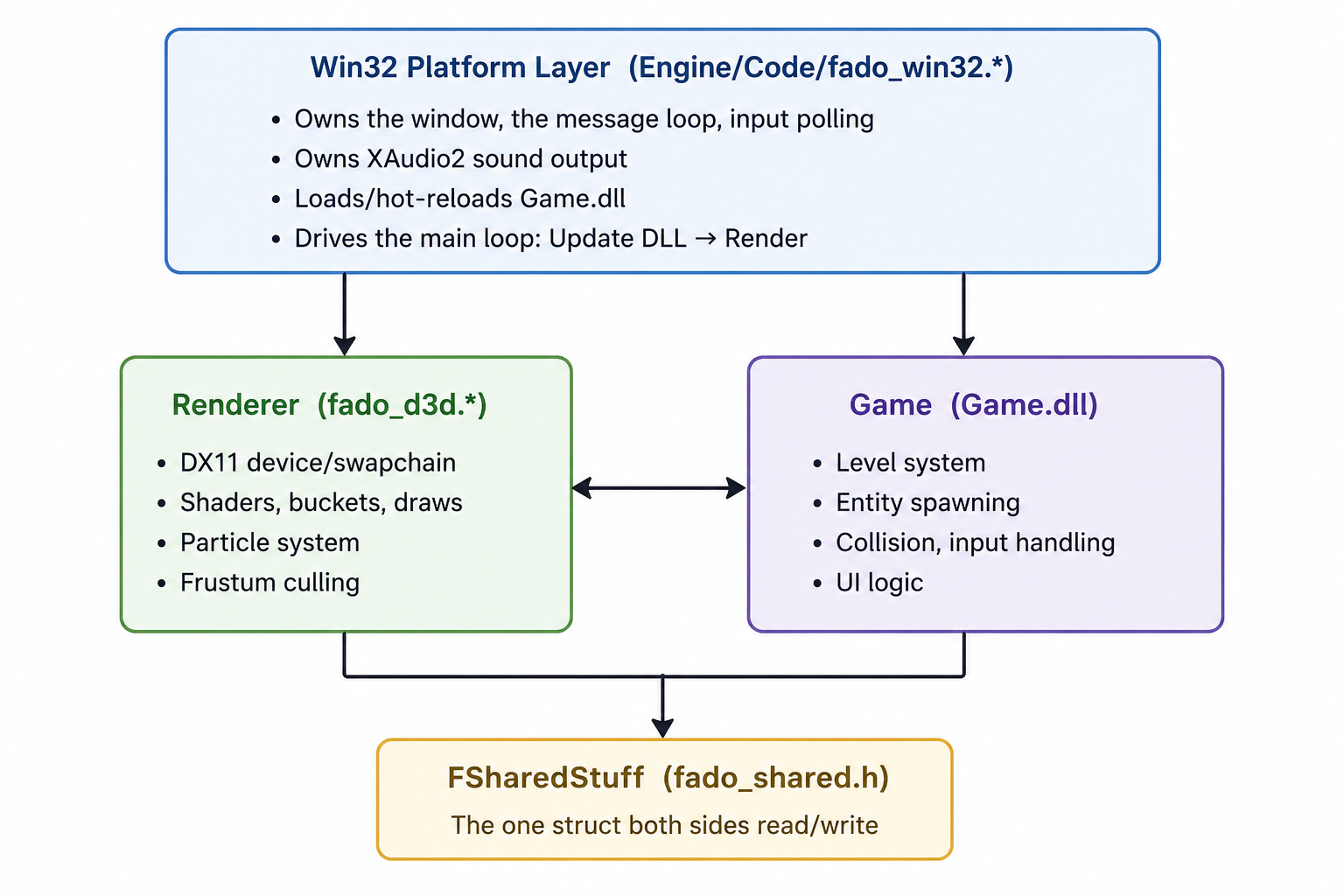
Data flows through one preallocated memory block (the arena system, see below),
and both the exe and the dll operate on the same FSharedStuff instance, the exe just hands the dll a pointer to it every frame.
Win32 Platform Layer
This is where main (wWinMain) lives, and the only part of the
engine that is Windows-specific.
Its responsibilities:
- Window creation & the message loop
Creates the
HWND, registers the window class, and pumps Windows messages every frame (Win32HandleWindowsMessageLoop). - Game code hot reloading
Load
Game.dllusing a temp-file copy so the original .dll isn't locked while the build system rewrites it, and the main loop checks the DLL's last-write time every frame to reload it automatically when you rebuild. - Input
Poll keyboard and controller input via XInput, filling in
FGameInputand handing it to the game. - Sound output
Owns the XAudio2 device, a pool of 3D voices for spatial sounds, and streams the mixed output buffer built by the sound system each frame.
- The main loop
Every frame, calculates delta time, polls input and triggers the game update function, renders and updates audio.
The platform layer allocates all engine memory once via VirtualAlloc at startup and never allocates again during the session.
Fully movable and resizable window
Renderer
The renderer is a self-contained DX11 layer. Only InitializeFD3D and Render, assets
loaders, and a resize window function are exposed, every DX11 type is contianed in fado_d3d.*.
Core Parts:
| Concept | Struct | Purpose |
|---|---|---|
| Device/swapchain/depth buffer | FD3D |
The raw DX11 objects every renderer needs |
| Main shader | FMaterialShader |
One unified shader for lit/unlit, textured/colored, transparent entities |
| Particle shader | FParticleShader |
GPU-instanced billboard rendering for particles |
| UI shader | FUIShader |
Screen-space quads with vertex color, used by the UI bucket |
| Draw call | FDrawCall / FRenderBucket |
Draw calls are pushed into opaque/transparent buckets and flushed once per frame |
| Meshes | FMeshBuffer |
Raw vertex/index buffer pool shared by all loaded models |
| Frustum culling | FFrustum / FFrustumPlane |
Extracted from the view-projection matrix; used to skip drawing off-screen entities |
FRenderWorld
// Renderer state and GPU resources.
// This struct includes everything that is displayed on the screen.
struct FRenderWorld
{
	FD3D d3d;
	FSharedStuff* shared;

	// Shaders (initialized once).
	FMaterialShader materialShader;
	FParticleShader particleShader;
	FUIShader uiShader;

	// Draw buckets (opaque rendered before transparent).
	FRenderBucket opaqueBucket;
	FRenderBucket transparentBucket;
	// UI bucket lives in shared (used by both game and renderer).

	// GPU buffer pool (shared by both simple meshes and baked models).
	FMeshBuffer meshes[FMAX_MESHES];
	u32 meshCount;

	// Texture pool.
	FTexture textures[FMAX_TEXTURES];
	u32 texturesCount;

#if FADO_DEBUG
	FDebugLineBucket debugBucket;
#endif
};
Per-frame flow (Render):
void Render(FRenderWorld* world)
{
	FD3D* d3d = &world->d3d;

	// Clear the buffers to begin the scene.
	BeginScene(d3d, v4{ 0.0f, 0.0f, 0.0f, 1.0f });

	// Rebuild the view matrix from the camera entity's transform.
	RenderCamera(world);

    // Frustum-cull and push every visible entity into the opaque or transparent bucket
    // (based on Material_Transparent/alpha), plus a blob shadow draw call for any
    // entity flagged Material_CastShadow.
	DrawSceneEntities(world);

    // draws opaque, then transparent, then all active particle emitters,
    // then the UI bucket, each with the appropriate blend/depth/rasterizer state set once per
    // bucket (not per draw call).
	FlushBuckets(world);

	// Presents the back buffer (and renders ImGui, in debug builds).
	EndScene(d3d);
}
UI and particles are pushed into their respective buckets from the game, because that's where they get created (check their sections for more details), however, entities are iterated over here in the renderer, and visualized based on their data.
DrawSceneEntities
// Push draw calls for all entities in the frustum;
internal void DrawSceneEntities(FRenderWorld* world)
{
	FFrustum frustum;
	DXMatrix viewProj = (DXMatrix)(world->shared->camera.view * world->shared->camera.projection).m;
	ExtractFrustumPlanes(&frustum, viewProj);

	FEntityTable* entTable = &world->shared->entityTable;
	for (u32 i = 0; i < entTable->count; ++i)
	{
		FEntity* entity = &entTable->entities[i];
		if (entity->hMesh == INVALID_HANDLE)
		{
			continue;
		}

		v3 pos = world->shared->transforms.positions[i];
		f32 entityRadius = 2.5f * GetEntityScaleAverage(world->shared, i);

		if (!SphereInFrustum(&frustum, pos, entityRadius))
		{
			continue;
		}

		DXMatrix worldMatrix = BuildEntityWorldMatrix(i, world->shared);
		PushDrawCall(world, worldMatrix, entity->hMesh, entity->material, entity->spriteRect);

		if (entity->material.flags & Material_CastShadow)
		{
			if (entity->material.flags & Material_Transparent)
			{
				PushBlobShadow2D(world, pos);
			}
			else
			{
				PushBlobShadow(world, pos, entityRadius);
			}
		}
	}
}
For each entity in the frustum, we add a draw call to it, which gets flushed in the render function.
Draw calls simply hold the material's data needed in the shader, and the world matrix.
// One mesh/material draw request.
struct FDrawCall
{
	DXMatrix worldMatrix;
	HMesh hMesh;
	FMaterial material;
	v4 spriteRect;		// Atlas UVs (sprites only)
};
Each shader struct in the renderer is self contained and has all the required buffers that match those in the shader:
// One main shader. It can be colored, tinted with a texture and supports transparency.
struct FMaterialShader
{
	// Compiled shaders.
	ID3D11VertexShader* vertexShader;
	ID3D11PixelShader* pixelShader;

	// Vertex input layout.
	ID3D11InputLayout* layout;

	// Texture sampling state.
	ID3D11SamplerState* sampleState;

	// GPU constant buffers.
	ID3D11Buffer* matrixBuffer;		// VS b0
	ID3D11Buffer* lightBuffer;		// PS b0
	ID3D11Buffer* materialBuffer;	// PS b1
};
The buffers are mapped to the actual shader when the draw call is flushed, and then we draw the shader.
Material Shader
////////////////////////////////////////////////////////////////////////////////
// Filename: material.hlsl
////////////////////////////////////////////////////////////////////////////////

/////////////
// GLOBALS //
/////////////

 // Vertex Shader constant buffer slot 0
cbuffer MatrixBuffer : register(b0)
{
    matrix worldMatrix;
    matrix viewMatrix;
    matrix projectionMatrix;
};

// Pixel Shader constant buffer slot 0
cbuffer LightBuffer : register(b0)
{
    float4 ambientColor;
    float4 diffuseColor;
    float3 lightDirection;
    float padding;
};

// Pixel Shader constant buffer slot 1
cbuffer MaterialBuffer : register(b1)
{
    float4 color;
    int hasTexture;
    int isLit;
    float2 _pad;
    float4 spriteRect;
};

Texture2D ShaderTexture : register(t0);
SamplerState SampleType : register(s0);

/////////////
// TYPEDEFS //
/////////////
struct VertexInput
{
    float4 position : POSITION;
    float3 normal :   NORMAL;
    float2 tex :      TEXCOORD0;
};

struct PixelInput
{
    float4 position : SV_POSITION; // SV = System Value
    float3 normal :   NORMAL;
    float2 tex :      TEXCOORD0;
};

////////////////////////////////////////////////////////////////////////////////
// Vertex Shader
////////////////////////////////////////////////////////////////////////////////
PixelInput VertexShaderEntry(VertexInput input)
{
    PixelInput output;

    input.position.w = 1.0f;

    output.position = mul(input.position, worldMatrix);
    output.position = mul(output.position, viewMatrix);
    output.position = mul(output.position, projectionMatrix);

    output.normal = normalize(mul(input.normal, (float3x3) worldMatrix));
    output.tex = input.tex;

    return output;
}

////////////////////////////////////////////////////////////////////////////////
// Pixel Shader
////////////////////////////////////////////////////////////////////////////////
float4 PixelShaderEntry(PixelInput input) : SV_TARGET
{
    float4 baseColor = color;

    if (hasTexture)
    {
        float2 atlasUV = input.tex * spriteRect.zw + spriteRect.xy;
        baseColor *= ShaderTexture.Sample(SampleType, atlasUV);
    }

    if (isLit)
    {
        float3 lightDir = -lightDirection;
        float lightIntensity = saturate(dot(input.normal, lightDir));

        float4 litColor = ambientColor + (diffuseColor * lightIntensity);

        baseColor *= saturate(litColor);
    }

    return baseColor;
}
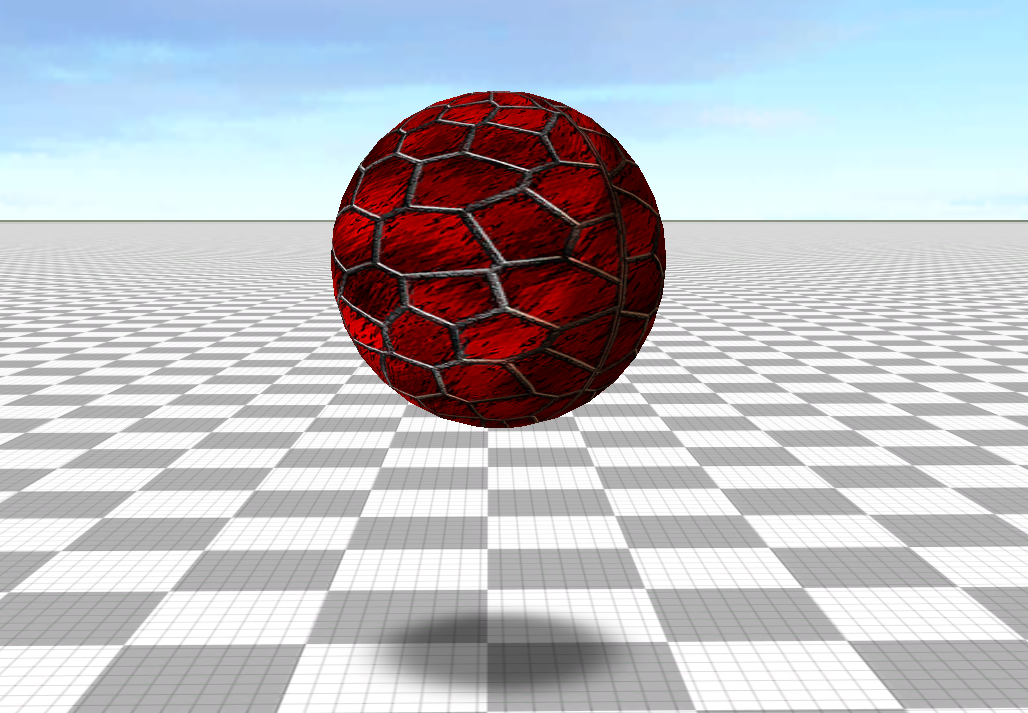
Shadows
Shadows are handled as simple blob shadows: a soft, alpha-faded quad decal projected onto the ground beneath a shadow-casting entity, rather than full shadow mapping.

Game Layer
The Game project compiles to Game.dll and exposes exactly one function to the engine:
#define GAME_UPDATE(name) void name(FGameState* gameState, struct FGameInput* input)
typedef GAME_UPDATE(FGameUpdate);
FGameState is the game's own top-level struct; it holds everything the game layer needs:
FGameState
struct FGameState
{
    FGameInput* input;
    FSharedStuff* shared;

    FSoundManager* soundManager;

    FLevel* currentLevel;

    FFont* font;
    FUINavState uiNavState;

    f32 cameraYaw;   // degrees, accumulates freely
    f32 cameraPitch; // degrees, clamped to [-89, 89]

    b8 running;
    b8 paused;
    b8 initialized;
};
The update function simply calls update on the current level (more below):
Game State Update
// Main game update function, the only function that exported the engine (.exe).
extern "C" __declspec(dllexport)
GAME_UPDATE(GameUpdate)
{
    if (!gameState->initialized)
    {
        gameState->initialized = true;

        FDirectionalLight* dirLight = &gameState->shared->dirLight;
        dirLight->ambientColor = { 0.5f, 0.35f, 0.25f, 1.0f };
        dirLight->diffuseColor = { 1.75f, 1.0f, 1.0f, 1.0f };
        dirLight->lightDirection = { 1.75f, -1.0f, 1.0f };

        // Load level_3d_showcase by default.
        LoadLevel(gameState, SetupLevel_3DShowcase());
    }

    if (gameState->currentLevel->Update)
    {
        gameState->currentLevel->Update(gameState, gameState->input->deltaTime);
    }

    if (gameState->paused)
    {
        UpdateUI(gameState, input);
    }
}
Levels
Levels are just a name plus three function pointers:
struct FLevel
{
    void (*Init)(FGameState*);
    void (*Begin)(FGameState*);
    void (*Update)(FGameState*, f32 dt);
    cc8* name;
};
Any new level inherits this struct and must assign a name and those three functions, simple as that.
The reason I use inheritance here is because I want every level to have its own set of entities.
Example:
struct FLevel_3DShowcase : FLevel
{
    HEntity infinitePlane;
    HEntity skyBox;
    HEntity cube1;
    HEntity cube2;
    HEntity sphere1;
    HEntity sphere2;

    HEntity fire;
    HParticle hFireParticle;
    HSound hFireSFXInstance;
};
Those handles only matter to that level, the game state won't ever ask about them, all it cares about is a "Make" function and the update function. (more about handles in the Entities section).
Level Make Function
inline FLevel SetupLevel_3DShowcase()
{
    FLevel_3DShowcase level = {};
    level.Init = Level_3DShowcase_Init;
    level.Begin = Level_3DShowcase_Begin;
    level.Update = Level_3DShowcase_Update;
    level.name = "level_3d_showcase";
    return level;
};
Saving & Loading Levels
Levels are saved as a custom .flevel file, which is just a binary dump of all
the entities in the level, and their transform. (Check assets section for more).
Saving Entities in Levels
FTransforms* transformTable = &gameState->shared->transforms;
FEntityDesc entityDesc;
for (u32 i = 0; i < entitiesCount; ++i)
{
    entityDesc = {};
    entityDesc.entity = entities[i];
    entityDesc.pos = GetEntityPosition(gameState->shared, i);
    entityDesc.rot = GetEntityRotation(gameState->shared, i);
    entityDesc.scale = GetEntityScale(gameState->shared, i);
    fwrite(&entityDesc, sizeof(FEntityDesc), 1, file);
}
Init always runs to set up an entity's default state; if a saved .flevel file exists,
its entities are then overridden in the same spawn order
(order matters; a saved handle must still point at the same conceptual entity when reloaded).
Loading Levels
// Loads the passed level by its name.
// Always calls the levels Init, then overrides the saved entities in order if the saved file exists.
// Always calls Begin afterwards.
inline b8 LoadLevel(FGameState* gameState, FLevel level)
{
    UnloadCurrentLevel(gameState);

    *gameState->currentLevel = level;
    level.Init(gameState);

    c8 src[FMAX_PATH];
    GetLevelPathFromName(src, level.name);

    FILE* file = fopen(src, "rb");
    if (file)
    {
        FAssetHeader assetHeader = {};
        fread(&assetHeader, sizeof(FAssetHeader), 1, file);

        if (assetHeader.magic != FASSET_MAGIC ||
            assetHeader.assetType != FASSET_TYPE_LEVEL ||
            assetHeader.version != FASSET_VERSION)
        {
            fclose(file);
            return false;
        }

        FLevelHeader levelHeader = {};
        fread(&levelHeader, sizeof(FLevelHeader), 1, file);

        // Override saved entities data from the saved file.
        FTransforms* transforms = &gameState->shared->transforms;
        for (u32 i = 0; i < levelHeader.entityCount; ++i)
        {
            FEntityDesc desc;
            fread(&desc, sizeof(FEntityDesc), 1, file);
            FEntity* entity = &gameState->shared->entityTable.entities[i];
            *entity = desc.entity;
            transforms->positions[i] = desc.pos;
            transforms->scales[i] = desc.scale;
            transforms->rotations[i] = desc.rot;
        }
        fclose(file);
    }

    // Call begin on the level.
    level.Begin(gameState);
    return true;
}
Unloading a level is simply setting almost everything to zero (no deletion).
One of the main goals of Fado Engine is to allow quick prototyping of different systems. Levels allow us to do that easily; the game state acts as a bridge between the level-specific code and the game. This means that levels can be self-contained, i.e. you can drop a header of some game you made and it should just work.
Memory: The Arena System
Fado does no dynamic (heap) allocation during gameplay. Everything lives
in one VirtualAlloc'd block, split into three arenas with different lifetimes:
struct FEngineMemory
{
    FMemoryArena permanent; // lives for the entire session
    FMemoryArena scratch;   // transient — MUST be reset manually after use
    FMemoryArena level;     // reused every time a level (re)loads
};
| Arena | Size (currently) | Lifetime | Used for |
|---|---|---|---|
permanent |
64 MB | Whole process | FGameState, FSharedStuff, the render world,
all loaded shaders, anything created once at startup |
scratch |
15 MB | One operation/Function | Temporary buffers during asset loading/decompression.
Always ArenaReset() immediately after use |
level |
1 MB | Per level | The current FLevel's own data, zeroed on unload/td>
|
A FMemoryArena is nothing more than a base pointer,
a used offset, and a size; a linear "bump" allocator:
internal void* AreaPushSize_(FMemoryArena* arena, u32 size)
{
    Assert((arena->used + size) <= arena->size);
    void* result = arena->base + arena->used;
    arena->used += size;
    return result;
}
Three convenience macros wrap it:
ArenaPushType(arena, FGameState)          // push one instance of a type
ArenaPushSize(arena, u8, sizeInBytes)     // push a raw byte block
ArenaPushArray(arena, FEntity, count)     // push a fixed-count array of a type
There's no per-allocation Free; arenas are only ever reset wholesale
internal void ArenaReset(FMemoryArena* arena)
{
	arena->used = 0;
}
Memeory Allocation Example in WinMain
// Create all memory for the game upfront, and use it across the game.
FEngineMemory engineMemory = {};
u32 totalSize = PERMANENT_ARENA_SIZE + SCRATCH_ARENA_SIZE + LEVEL_ARENA_SIZE;	// 80 MB
void* base = VirtualAlloc(0, totalSize, MEM_RESERVE | MEM_COMMIT, PAGE_READWRITE);
engineMemory.permanent = ArenaMake((u8*)base, PERMANENT_ARENA_SIZE);
engineMemory.scratch = ArenaMake((u8*)base + PERMANENT_ARENA_SIZE, SCRATCH_ARENA_SIZE);
engineMemory.level = ArenaMake((u8*)base + PERMANENT_ARENA_SIZE + SCRATCH_ARENA_SIZE, LEVEL_ARENA_SIZE);

// Game state and shared stuff.
FGameState* gameState = ArenaPushType(&engineMemory.permanent, FGameState);
gameState->shared = ArenaPushType(&engineMemory.permanent, FSharedStuff);
gameState->shared->arena = &engineMemory;
gameState->currentLevel = ArenaPushSize(&engineMemory.level, FLevel, LEVEL_ARENA_SIZE);
gameState->font = ArenaPushType(&engineMemory.permanent, FFont);
What's amazing about this is that without dynamic allocations and heap alloctions, you never have to deal with memory, there are no dangling pointer or memory leaks, essentially the engine NEVER CRASHES.
Furthermore, since all our memory was allocated in winMain, it all gets automatically destroyed once the application shuts down, no need for custom shut down functions or destructors.
Custom Asset Pipeline (.f* formats)
Rather than loading and parsing .png/.wav/.glb..etc directly at runtime,
Fado Converter cooks source assets ahead of time into its own compact, LZ4-compressed formats:
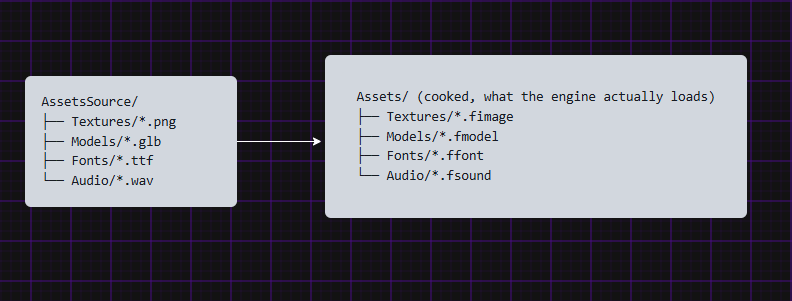
FadoConverter (a separate standalone tool project, excluded from the main Engine build)
reads the source formats and writes cooked .f* files.
cook_assets.bat
set FORMATS=*.png *.jpg *.tga *.bmp *.glb *.ttf *.wav
for /r "%SRC_DIR%" %%f in (%FORMATS%) do (
    set "rel=%%~dpf"
    set "rel=!rel:%SRC_DIR%\=!"

    mkdir "%OUT_DIR%\!rel!" 2>nul

    set "name=%%~nf"
    set "ext=%%~xf"

    rem Default extension
    set "outExt=.fasset"

    if /I "!ext!"==".png" set "outExt=.fimage"
    if /I "!ext!"==".jpg" set "outExt=.fimage"
    if /I "!ext!"==".tga" set "outExt=.fimage"
    if /I "!ext!"==".bmp" set "outExt=.fimage"

    if /I "!ext!"==".glb" set "outExt=.fmodel"

    if /I "!ext!"==".ttf" set "outExt=.ffont"

    if /I "!ext!"==".wav" set "outExt=.fsound"

    %CONVERTER% "%%f" "%OUT_DIR%\!rel!!name!!outExt!"
)
In the cpp file, we have a simple assets dispatcher; each type of asset must define a "Bake" function,
which gets called in from the .bat script above:
/*
 * Asset Pipeline Dispatcher.
   - Calls the bake function based on the type "extenstion".
   - Each type is manually added to importers with the dispatched function.
*/

typedef bool AssetBakeFn(const char* src, const char* dst);

struct AssetImporter
{
    const char* extension;
    AssetBakeFn* bake;
};

// Bake functions forwards
bool BakeImage(const char* src, const char* dst);
bool BakeModel(const char* src, const char* dst);
bool BakeFont(const char* src, const char* dst);
bool BakeSound(const char* src, const char* dst);

// All types here
// >> Important: Increase the count if you add more/new types.
#define ASSET_IMPOSTERS_COUNT 7
AssetImporter importers[ASSET_IMPOSTERS_COUNT] =
{
    { ".png",  BakeImage },
    { ".jpg",  BakeImage },
    { ".jpeg", BakeImage },
    { ".tga",  BakeImage },
    { ".glb",  BakeModel },
    { ".ttf",  BakeFont  },
    { ".wav",  BakeSound }
};
Every cooked file shares one common header:
struct FAssetHeader
{
    u32 magic;      // "FAS1"
    u32 assetType;  // FASSET_TYPE_IMAGE / MODEL / FONT / SOUND / LEVEL
    u32 version;
    u32 reserved;
};
followed by a type-specific header (FImageHeader, FModelHeader, FFontHeader, FSoundHeader, FLevelHeader)
and then the payload; LZ4-compressed pixel data, vertex/index blobs, PCM samples, or serialized
entity descriptors, depending on type. Textures additionally support BC1/BC3
block-compressed formats with mip chains alongside plain RGBA8.
At runtime, the engine's loaders all follow the same shape: read the header, LZ4_decompress_safe
the payload into the scratch arena, upload to the appropriate GPU/engine resource, then reset scratch.
Example: .fmodel Loading (converted from .glb)
// ────────────────────────────────────────────────────────────────────────
// Model loader — .fmodel
// ────────────────────────────────────────────────────────────────────────
HMesh LoadFModel(FRenderWorld* world, cc8* fileName)
{
	FILE* file = fopen(fileName, "rb");
	if (!file)
	{
		return INVALID_HANDLE;
	}

	FAssetHeader header = {};
	fread(&header, sizeof(header), 1, file);
	Assert(header.magic == FASSET_MAGIC);
	Assert(header.assetType == FASSET_TYPE_MODEL);

	FModelHeader modelHeader = {};
	fread(&modelHeader, sizeof(modelHeader), 1, file);

	FMeshDesc* descs = ArenaPushArray(&world->shared->arena->scratch, FMeshDesc, modelHeader.meshCount);
	fread(descs, sizeof(FMeshDesc), modelHeader.meshCount, file);

	// Read + decompress vertex blob
	u8* vbCompressed = ArenaPushSize(&world->shared->arena->scratch, u8, modelHeader.vertexDataSize);
	fread(vbCompressed, 1, modelHeader.vertexDataSize, file);
	u8* vbData = ArenaPushSize(&world->shared->arena->scratch, u8, modelHeader.vertexDataUncompressed);
	LZ4_decompress_safe((const char*)vbCompressed, (c8*)vbData,
		(i32)modelHeader.vertexDataSize, (i32)modelHeader.vertexDataUncompressed);

	// Read + decompress index blob
	u8* ibCompressed = ArenaPushSize(&world->shared->arena->scratch, u8, modelHeader.indexDataSize);
	fread(ibCompressed, 1, modelHeader.indexDataSize, file);
	u8* ibData = ArenaPushSize(&world->shared->arena->scratch, u8, modelHeader.indexDataUncompressed);
	LZ4_decompress_safe((const char*)ibCompressed, (char*)ibData,
		(i32)modelHeader.indexDataSize, (i32)modelHeader.indexDataUncompressed);

	fclose(file);

	u32 handle = world->meshCount;
	Assert(world->meshCount < FMAX_MESHES);

	for (u32 i = 0; i < modelHeader.meshCount; i++)
	{
		FMeshDesc* desc = &descs[i];
		FTextureVertex* verts = (FTextureVertex*)(vbData + desc->vertexOffset);
		u32* indices = (u32*)(ibData + desc->indexOffset);

		FMeshBuffer* mesh = &world->meshes[world->meshCount++];
		mesh->vertexStride = sizeof(FTextureVertex);
		UploadMesh(mesh, world->d3d.device, verts, desc->vertexCount,
			mesh->vertexStride, indices, desc->indexCount);
	}

	ArenaReset(&world->shared->arena->scratch);
	return handle;
}
Entities, Transforms & Handles
Fado uses a lightweight, array-based Entity Component pattern with handles to access elements (SoA).
Entities
Entities in Fado are essentially things that have a transform in the world, and optionally can be visualized.
struct FEntity
{
    HMesh hMesh;				// hQuad for 2D
    FMaterial material;			// texture, color, alpha

    v4 spriteRect;				// UV region, {0,0,1,1} for non-atlas
    FAnimState animState;		// only used for sprites.
};
When an entity gets "spawned", it is simply taking the next place in an array:
struct FEntityTable
{
	FEntity entities[FMAX_ENTITIES];
	u32 count;
};
Levels' Init is where usually entities get spawned:
SpawnEntity
// Adds an entity to the entity table and gives it a transform.
// - No dynamic allocation of any sorts, just setting values to an existing array/table.
inline HEntity SpawnEntity(FSharedStuff* shared, HMesh hMesh, HTexture hTex = INVALID_HANDLE,
    v4 color = V4One(), u8 materialFlags = Material_None, v4 rect = { 0, 0, 1, 1 })
{
    FTransforms* transforms = &shared->transforms;

    HEntity handle = shared->entityTable.count++;
    FEntity* entity = &shared->entityTable.entities[handle];
    entity->hMesh = hMesh;

    FMaterial mat = {};
    mat.color = color;
    mat.texture = hTex;
    mat.flags = materialFlags;
    entity->material = mat;

    // By default full texture.
    entity->spriteRect = rect;

    transforms->positions[handle] = {};
    transforms->scales[handle] = V3One();
    transforms->rotations[handle] = QuatIdentity();
    return handle;
}
Transforms
Transforms are a struct of position, rotation, and scale arrays, which all use the same handle of an entity. This is for simplicity and because so far, all entities actually need/have a transform in the world.
struct FTransforms
{
    v3 positions[FMAX_ENTITIES];
    v3 scales[FMAX_ENTITIES];
    quat rotations[FMAX_ENTITIES];
};
Materials
As mentioned in the Renderer section, entities use one unified material shader.
FMaterial contains all data that the shader needs, a texture, a color that can be applied
as tint, and some material flags.
enum EMaterialFlags : u8
{
	Material_None		 = 0,
	Material_Lit		 = 1 << 0,	// Whether the material calculates light or not.
	Material_Transparent = 1 << 1,	// While we use the alpha channel in the color for transparency, this allows us to transparent blend alpha channels in texture for sprites.
	Material_CastShadow  = 1 << 2,	// Whether the material casts a shadow blob.
};

struct FMaterial
{
	v4 color;			// Used as the main texture or applied as tint to a texture.
	HTexture texture;   // hWhiteTexture = no texture (color)
	u8 flags;			// Material flags
};
Materials and their flags are used in the renderer to correctly setup the shader buffers (check Renderer for more).
Lastly, entities have some optional sprite animation data, but more on that below (Sprite Animations section).
Subsystems
A few other systems round out the engine, each self-contained in its own header:
Collision
A from-scratch broad-phase + narrow-phase collision system, sharing the same code path
for both 2D and 3D games. It's driven entirely by data on FCollisionWorld
struct FCollisionWorld
{
	FColliderTable  colliders;
	FUniformGrid    grid;

	// Scratch buffers, reset each frame:
	FCollisionPair  pairs[FMAX_COLLISION_PAIRS];
	u32             pairCount;

	FContactInfo    contacts[FMAX_CONTACTS];
	u32             contactCount;
};
Collision is only accounted for entities that actually have it; it is added with:
HCollider CollisionAddCollider(FCollisionWorld* world, HEntity entityID, v3 halfExtents, ECollisionFlags flags);
Then every frame we go through three stages:
Stage 1: Collision Update
This is where we build the colliders through another three steps:
-
Build AABBs And OBBs
We always build AABBs so we can use them in the broad phase, then based on the entity's rotation, we decide whether an OBB is needed or not:
CollisionBuildAABBsAndOBBs
// Always builds an AABB that is used for broad faze, // and builds an OBB if the rotation isn't identity and the collision is solid, // otherwise use AABB also for the narrow faze. internal void CollisionBuildAABBsAndOBBs(FCollisionWorld* collisionWorld, FTransforms* transforms) { for (u32 i = 0; i < collisionWorld->colliders.count; ++i) { FCollider* collider = &collisionWorld->colliders.colliders[i]; v3 pos = transforms->positions[collider->entityID]; v3 scale = AbsV3(transforms->scales[collider->entityID]); quat rot = transforms->rotations[collider->entityID]; collider->worldAABB = AABBFromTransform(pos, scale, collider->halfExtents); // Decide if this collider should use OBB in narrow phase. collider->useOBB = ((collider->flags & COLLISION_SOLID_MASK) && !IsQuatIdentity(rot)); if (collider->useOBB) { collider->worldOBB = OBBFromTransform(pos, rot, scale, collider->halfExtents); } } } -
Broad Phase
Rather than testing every collider against every other
(O(n²)), colliders are inserted into a flat, world-space grid; Only colliders sharing a cell are emitted as candidate pairs.CollisionBroadPhase
internal void CollisionBroadPhase(FCollisionWorld* collisionWorld, FMemoryArena* scratchArena) { // Clear grid. for (i32 i = 0; i < (GRID_WIDTH * GRID_HEIGHT); ++i) { collisionWorld->grid.cells[i].count = 0; } collisionWorld->pairCount = 0; // Insert every collider into all cells its AABB overlaps. for (u32 i = 0; i < collisionWorld->colliders.count; ++i) { const FAABB& box = collisionWorld->colliders.colliders[i].worldAABB; i32 x0 = GridCellX(&collisionWorld->grid, box.min.x); i32 x1 = GridCellX(&collisionWorld->grid, box.max.x); if (collisionWorld->colliders.colliders[i].flags & Collision_Is2D) { i32 y0 = GridCellY(&collisionWorld->grid, box.min.y); i32 y1 = GridCellY(&collisionWorld->grid, box.max.y); for (i32 cy = y0; cy <= y1; ++cy) { for (i32 cx = x0; cx <= x1; ++cx) { GridInsert(&collisionWorld->grid, cx, cy, i); } } } else { i32 z0 = GridCellZ(&collisionWorld->grid, box.min.z); i32 z1 = GridCellZ(&collisionWorld->grid, box.max.z); for (i32 cz = z0; cz <= z1; ++cz) { for (i32 cx = x0; cx <= x1; ++cx) { GridInsert(&collisionWorld->grid, cx, cz, i); } } } } // --- Walk every cell, emit unique pairs --- // We use a simple tag array (per-frame stamp) to avoid duplicate pairs // when a large AABB spans multiple cells. // A pair (a,b) is canonical when a < b. u32* pairTagA = ArenaPushArray(scratchArena, u32, FMAX_COLLISION_PAIRS); u32* pairTagB = ArenaPushArray(scratchArena, u32, FMAX_COLLISION_PAIRS); // We will just do a linear scan to de-duplicate — fast enough for < 4k pairs. for (i32 cellIdx = 0; cellIdx < (GRID_WIDTH * GRID_HEIGHT); ++cellIdx) { FGridCell* cell = &collisionWorld->grid.cells[cellIdx]; for (u32 ai = 0; ai < cell->count; ++ai) { for (u32 bi = ai + 1; bi < cell->count; ++bi) { u32 a = cell->indices[ai]; u32 b = cell->indices[bi]; if (a > b) { u32 tmp = a; a = b; b = tmp; // canonical: a < b } // Check for duplicate pair b32 found = false; for (u32 pi = 0; pi < collisionWorld->pairCount; ++pi) { if ((pairTagA[pi] == a) && (pairTagB[pi] == b)) { found = true; break; } } if (!found && (collisionWorld->pairCount < FMAX_COLLISION_PAIRS)) { pairTagA[collisionWorld->pairCount] = a; pairTagB[collisionWorld->pairCount] = b; collisionWorld->pairs[collisionWorld->pairCount].a = a; collisionWorld->pairs[collisionWorld->pairCount].b = b; ++collisionWorld->pairCount; } } } } ArenaReset(scratchArena); } -
Narrow Phase
This is where each candidate pair is tested precisely, AABB-vs-AABB for non-rotated colliders, OBB-vs-OBB when either side has
useOBBsetCollisionBuildAABBsAndOBBs
internal void CollisionNarrowPhase(FCollisionWorld* collisionWorld)
{
    collisionWorld->contactCount = 0;

    for (u32 pi = 0; pi < collisionWorld->pairCount; ++pi)
    {
        u32 ai = collisionWorld->pairs[pi].a;
        u32 bi = collisionWorld->pairs[pi].b;

        FCollider* ca = &collisionWorld->colliders.colliders[ai];
        FCollider* cb = &collisionWorld->colliders.colliders[bi];

        if (!AABBOverlap(ca->worldAABB, cb->worldAABB))
        {
            continue;
        }

        // Skip if neither side is solid or trigger.
        if (!(ca->flags & (COLLISION_SOLID_MASK | ECollisionFlags::Collision_Trigger)) ||
            !(cb->flags & (COLLISION_SOLID_MASK | ECollisionFlags::Collision_Trigger)))
        {
            continue;
        }

        v3  normal = {};
        f32 penetration = 0.0f;

        if (ca->useOBB || cb->useOBB)
        {
            FOBB obbA = ca->useOBB ? ca->worldOBB : OBBFromAABB(ca->worldAABB);
            FOBB obbB = cb->useOBB ? cb->worldOBB : OBBFromAABB(cb->worldAABB);

            if (!OBBOverlap(obbA, obbB, &normal, &penetration))
            {
                continue;
            }
        }

        else
        {
            b32 is2D = (ca->flags & Collision_Is2D) && (cb->flags & Collision_Is2D);

            // --- Compute overlap on each axis ---
            f32 overlapX_pos = ca->worldAABB.max.x - cb->worldAABB.min.x;
            f32 overlapX_neg = cb->worldAABB.max.x - ca->worldAABB.min.x;
            f32 overlapY_pos = ca->worldAABB.max.y - cb->worldAABB.min.y;
            f32 overlapY_neg = cb->worldAABB.max.y - ca->worldAABB.min.y;
            f32 overlapZ_pos = ca->worldAABB.max.z - cb->worldAABB.min.z;
            f32 overlapZ_neg = cb->worldAABB.max.z - ca->worldAABB.min.z;

            // Pick the minimum penetration axis (SAT on AABB = just find smallest overlap).
            f32 minOverlapX = (overlapX_pos < overlapX_neg) ? overlapX_pos : overlapX_neg;
            f32 minOverlapY = (overlapY_pos < overlapY_neg) ? overlapY_pos : overlapY_neg;
            f32 minOverlapZ = (overlapZ_pos < overlapZ_neg) ? overlapZ_pos : overlapZ_neg;

            if (is2D)
            {
                if (minOverlapX <= minOverlapY)
                {
                    penetration = minOverlapX;
                    normal.x = (overlapX_pos < overlapX_neg) ? 1.0f : -1.0f;
                }
                else
                {
                    penetration = minOverlapY;
                    normal.y = (overlapY_pos < overlapY_neg) ? 1.0f : -1.0f;
                }
            }
            else
            {
                if ((minOverlapX <= minOverlapY) && (minOverlapX <= minOverlapZ))
                {
                    penetration = minOverlapX;
                    normal.x = (overlapX_pos < overlapX_neg) ? 1.0f : -1.0f;
                }
                else if ((minOverlapY <= minOverlapX) && (minOverlapY <= minOverlapZ))
                {
                    penetration = minOverlapY;
                    normal.y = (overlapY_pos < overlapY_neg) ? 1.0f : -1.0f;
                }
                else
                {
                    penetration = minOverlapZ;
                    normal.z = (overlapZ_pos < overlapZ_neg) ? 1.0f : -1.0f;
                }
            }
        }
        if (collisionWorld->contactCount < FMAX_CONTACTS)
        {
            FContactInfo* contact = &collisionWorld->contacts[collisionWorld->contactCount++];
            contact->entityA = ca->entityID;
            contact->entityB = cb->entityID;
            contact->normal = normal;
            contact->penetration = penetration;
            contact->isTrigger = (ca->flags & ECollisionFlags::Collision_Trigger) ||
                (cb->flags & ECollisionFlags::Collision_Trigger);
        }
    }
}
This stage results in a populated array of FContactInfo, which will be used in the next stage.
struct FContactInfo
{
	HEntity entityA;
	HEntity entityB;
	v3      normal;           // points from B -> A (push A out)
	f32     penetration;      // depth of overlap
	b32     isTrigger;		  // at least one side is a trigger no MTV applied
};
// MTV: Minimum Translation Vector. It's the smallest possible movement to separate two overlapping objects.
Stage 2: Collision Resolve
In this stage, the engine goes through the FContactInfo array and "pushes" collided entities aprat.
This is done through the Minimum Translation Vector (the smallest push needed to separate two overlapping solids) according to each side's flag-based priority below:
| Flag | Meaning |
|---|---|
Collision_Ignore |
No detection, no response, effectively disabled |
Collision_Trigger |
Overlap event only, no physics push |
Collision_Static |
Never moves, always pushes the other side fully (walls, floors) |
Collision_Kinematic |
Like Static but rebuilt every frame (moving/rotating platforms), always pushes fully |
Collision_Dynamic |
A normal solid mover (e.g. the player); pushed fully by Static/Kinematic, splits the push 50/50 with other Dynamics |
Collision_Physics |
Lowest-priority mover; pushed fully by anything above it, splits 50/50 with other Physics colliders |
Collision_Is2D |
Flattens the AABB onto the XY plane, ignoring the Z axis for that collider |
Using these flags, each collider is assigned a mass, which decides how much each entitiy gets pushed.
Collision Resolve
internal f32 CollisionMass(ECollisionFlags flags)
{
    // Immovable by default -> 0 share.
    f32 mass = 0.0f;

    if (flags & ECollisionFlags::Collision_Dynamic)
    {
        mass = 2.0f;
    }
    else if (flags & ECollisionFlags::Collision_Physics)
    {
        mass = 1.0f;
    }

    return mass;
}

void CollisionResolve(FCollisionWorld* collisionWorld, FTransforms* transforms)
{
    for (u32 ci = 0; ci < collisionWorld->contactCount; ++ci)
    {
        FContactInfo* contact = &collisionWorld->contacts[ci];
        if (contact->isTrigger)
        {
            continue;
        }

        FCollider* ca = nullptr;
        FCollider* cb = nullptr;
        for (u32 i = 0; i < collisionWorld->colliders.count; ++i)
        {
            if (collisionWorld->colliders.colliders[i].entityID == contact->entityA)
            {
                ca = &collisionWorld->colliders.colliders[i];
            }
            if (collisionWorld->colliders.colliders[i].entityID == contact->entityB)
            {
                cb = &collisionWorld->colliders.colliders[i];
            }
        }
        if (!ca || !cb)
        {
            continue;
        }

        f32 massA = CollisionMass(ca->flags);
        f32 massB = CollisionMass(cb->flags);

        // Both immovable -> nothing to resolve.
        if ((massA == 0.0f) && (massB == 0.0f))
        {
            continue;
        }

        if (contact->penetration <= 0.0f)
        {
            continue;
        }

        // shareA = fraction of penetration applied to A; shareB = fraction applied to B (opposite direction)
        f32 shareA, shareB;
        if ((massA == 0.0f) || (massB == 0.0f))
        {
            shareA = (massA == 0.0f) ? 0.0f : 1.0f;
            shareB = (massB == 0.0f) ? 0.0f : 1.0f;
        }
        else
        {
            f32 totalMass = massA + massB;
            shareA = massB / totalMass;
            shareB = massA / totalMass;
        }

        // Convert penetration depth into world-space movement vectors.
        // shareA + shareB always equals 1, so the full penetration is removed.
        v3 deltaA = { contact->normal.x * contact->penetration * shareA,
                      contact->normal.y * contact->penetration * shareA,
                      contact->normal.z * contact->penetration * shareA };
        v3 deltaB = { contact->normal.x * contact->penetration * shareB,
                      contact->normal.y * contact->penetration * shareB,
                      contact->normal.z * contact->penetration * shareB };

        if (shareA > 0.0f)
        {
            transforms->positions[ca->entityID].x -= deltaA.x;
            transforms->positions[ca->entityID].y -= deltaA.y;
            transforms->positions[ca->entityID].z -= deltaA.z;
        }
        if (shareB > 0.0f)
        {
            transforms->positions[cb->entityID].x += deltaB.x;
            transforms->positions[cb->entityID].y += deltaB.y;
            transforms->positions[cb->entityID].z += deltaB.z;
        }
    }
}
Stage 3: Game Logic
Now that the engine's default behavior is out of the way, we can handle the game's custom collision reactions.
Example:
for (u32 i = 0; i < collisionWorld->contactCount; ++i)
{
    FContactInfo* c = &collisionWorld->contacts[i];

    // Play a sound if the camera is colliding with anything
    if (IsEntityInPair(c, hCamera))
    {
        SoundPlay2D(gameState->soundManager, assets->hCollideSFX, ESoundCategory::Sound_SFX, 0.1f, false);
    }

    // Do something else if th camera is colliding with a specific entity
    if(AreEntitiesColliding(c, hCamera, hFireCube))
    {
        // Do something
    }
}
UI
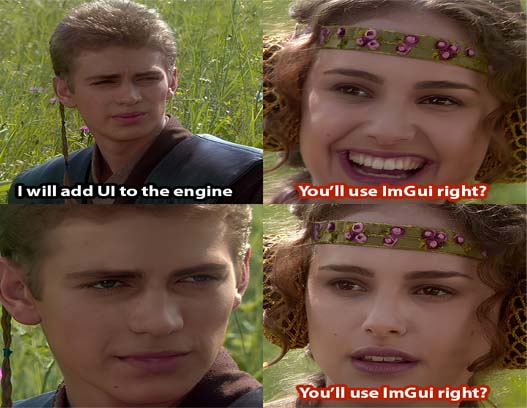
Well of course we'll make our own UI system from scratch!
The system is actually quite simple:
Game pushes UI commands to a bucket -> Renderer flushes the bucket and draws UI with a custom shader.
UI Comands
Commands simply consist of a rectangle, uv coords, color, and a texture:
// Rects use the texture they have as a base and apply a color on it,
// this allows us to use plain white textures to display colored rects and any texture
// for stylized rects.

struct FUICommand
{
	v4 rect;
	v4 coords;
	v4 color;
	HTexture hTexture;
};
The system is close to an immediate-mode UI system; commands are pushed each frame, not retained widgets.
For example, a button is just a rect with some text (more rects) on top of it.
UIPushButton
// Pushes a stylized button into the ui commads bucket.
inline void UIPushButton(v4 rect, cc8* text, FUICommandsBucket* bucket, FUIButtonStyle* style, FFont* font, b8 clicked, b8 hovered)
{
	v4 color = style->idleColor;
	if (clicked)
	{
		color = style->pressedColor;
	}
	else if (hovered)
	{
		color = style->hoverColor;
	}

	UIPushRect(bucket, rect, { 0, 0, 1, 1 }, color, style->texture);

	// Plcae the text in the center of the rect.
	v2 textSize = UIMeasureTextWidth(font, text);
	f32 textX = rect.x + (rect.width - textSize.x) * 0.5f;
	f32 textY = rect.y + (rect.height * 0.5f) + /*yoffset*/4.0f;
	UIPushText(bucket, font, text, { textX, textY }, style->textColor);
}
Text
Using our loaded fonts, creating text on the screen is simply pushing small rects from the font's atlas, using the atlas as the texture.
UIPushText
// Pushes text into the ui bucket to draw on the screen using a font.
// Font glyphs are just rects being drawn on the screen.
inline void UIPushText(FUICommandsBucket* bucket, FFont* font, cc8* text, v2 pos, v4 color)
{
	// Current pen position while laying out glyphs.
	v2 cursor = pos;

	for (cc8* p = text; *p; ++p)
	{
		// Skip unsupported characters (currently we only support ASCII).
		if (*p < 32 || *p > 127)
		{
			continue;
		}
		FFontGlyph* glyph = &font->glyphs[*p - 32];

		v4 rect = {
			cursor.x + glyph->offset.x,
			cursor.y + glyph->offset.y,
			(f32)glyph->width,
			(f32)glyph->height
		};
		v4 coords = glyph->coords;

		UIPushRect(bucket, rect, coords, color, font->atlas);
		cursor.x += glyph->xadvance;
	}
}
To actually position UI elements correctly, I set the position of the first one on the screen, the other ones just apply an relative offset to that position.
I also made a helper that "measures" a text's width so that it can centralize it in the button.
UIMeasureTextWidth
// Calculates the total width of a given text.
// Used to centralize the text in a rect.
inline v2 UIMeasureTextWidth(FFont* font, cc8* text)
{
	f32 width = 0.0f;

	for (cc8* p = text; *p; ++p)
	{
		if (*p < 32 || *p > 127)
		{
			continue;
		}

		FFontGlyph* glyph = &font->glyphs[*p - 32];
		width += glyph->xadvance;
	}

	v2 result = { width, (f32)font->size };
	return result;
}
Displaying UI
Each frame after everything else's been displayed, the renderer flushes the UI bucket with a transparent blend state and zero-depth stencil state.
UI is displayed in order of creation, i.e. for a button, we push the button then the text, so the renderer draws the rect first, which makes the text be on top of it.
Mouse Selection
Once we've created a button, we simply check if the mouse's position is within it's bounds.
// Returns true if the mouse position is withing the rect bounds.
inline b8 UIPointInRect(v2 mPos, v4 rect)
{
	b8 result = (mPos.x >= rect.x) && (mPos.x <= rect.x + rect.width) &&
				(mPos.y >= rect.y) && (mPos.y <= rect.y + rect.height);
	return result;
}
Controller Selection
Using a simple UI element index, we can navigate through a "list" of UI rects in order
UI Navigation State
// Controller UI navigation state.
struct FUINavState
{
	i32 focusedIndex;       // which button is currently selected
	i32 buttonCount;        // how many buttons were submitted this frame
};

// Moves focus to the next index.
// - wrap: true->Index will wrap to the first index if it reaches the last, otherwise stays on the last.
inline void UINavigateNext(FUINavState* nav, b8 wrap = true)
{
	i32 newIndex = nav->focusedIndex + 1;
	if (newIndex >= nav->buttonCount)
	{
		if (wrap)
		{
			nav->focusedIndex = 0;
		}
	}
	else
	{
		nav->focusedIndex = newIndex;
	}
}
Sound
Sound is managed and prepared each frame by the Sound Manager.
FSoundManager holds a pointer to all the sound assets, instances, and all data required for 2D and 3D sound.
In both 2D/3D, something is passed from the engine's sound layer into the platform-specific sound library, in our case XAudio2.
Sound Manager
// Holds all sound assets (pcm) and instances.
struct FSoundAssetBank
{
    FSoundBuffer assets[FMAX_SOUND_ASSETS];             // loaded assets
    u32 assetInstanceCount[FMAX_SOUND_ASSETS];          // how many instances currently use assets[i]
    FSoundInstance instances[FMAX_SOUND_INSTANCES];     // the actual sound instances being played this frame.
    u32 assetsCount;
};

// The sound manager, lives in the permanent arena and is used to manage and access all sound assets and instances.
struct FSoundManager
{
    FSoundAssetBank* assetBank;
    f32 categoryVolume[SOUND_CATEGORY_COUNT];
    f32 masterVolume;
    FSoundListener listener;
    i16* mixBuffer;         // the 2D mix buffer that get used to output the 2D audio mix.

    // Set to false when we want to stop all 2D and 3D soudns.
    // Used so that the platform layer can stop 3D audios.
    b32 active;
};
Sound Assets & Instances
While producing 2D & 3D audio differs, they both use the same assets, which are loaded as custom .fsound
and stored in FSoundAssetBank
Sound assets work as follows:
-
Sound Buffers
Loaded sound asset (PCM data decoded from WAV).
FSoundBuffer
// A loaded sound asset (PCM data decoded from WAV). struct FSoundBuffer { i16* samples; // the actual wave data, just an array of numbers u32 sampleCount; // how many samples (per channel) u32 channels; // 1=mono, 2=stereo u32 sampleRate; // 44100, 48000, etc }; -
Sound Instances
The actual sound instances being played this frame.
FSoundInstance
// A playing instance of a sound. // The instance holds a handle to the sound asset buffer in the sound assets bank "bufferIndex". // This allows us to play one sound asset multiple times simultaneously. // 2D audio instances gets mixed each frame by the sound manager and played in one buffer. // 3D audio instances hold a voice slot index that gets used and updated in a 3D voice pool in the platform layer and played by its own. struct FSoundInstance { HSound bufferIndex; // index into SoundAssetBank.assets ESoundCategory category; u32 cursor; // current playback position (sample index) ONLY 2D f32 volume; // 0.0 - 1.0 b8 playing; b8 loop; b8 active; // 3d audio only: b8 is3D; HEntity attachedTo; // The entity this sound is attached to. INVALID_HANDLE for none. Used for postion update in 3D sounds. v3 position; f32 minDistance; f32 maxDistance; i32 voiceSlot; // index into platform voice pool, -1 if unassigned. }; -
Sound Assets' Instance Count
How many instances are using the same sound asset this frame.
Both 2D/3D rely on the loaded sound asset and the allowed number of instances to even start to produce any sound.
2D Sound
Every frame we hand the platform's sound library a mixed sound output buffer.
struct FSoundOutput
{
    i16* samples;       // All active sounds added together into one buffer
    u32 sampleCount;    // how many samples to fill this frame, ~1000-4000 samples (a few ms of audio)
};
For every 2D sound playing, we advance its cursor every frame, grab the sound sample there and add it to the mix buffer.
SoundMixInstance
/*
* Mixes one instance into the passed output buffer for one audio frame.
* interleaved stereo
- The output buffer looks like this:
  Index:   0   1   2   3   4   5   6   7
  Data :   L0  R0  L1  R1  L2  R2  L3  R3
*/
inline void SoundMixInstance(FSoundManager* manager, FSoundInstance* instance, i32 instanceHandle, FSoundOutput* output)
{
    // Final playback volume.
    f32 volume = (instance->volume * manager->categoryVolume[instance->category] * manager->masterVolume);

    FSoundBuffer* buffer = &manager->assetBank->assets[instance->bufferIndex];

    // Mix one output sample at a time.
    for (u32 sample = 0; sample < output->sampleCount; ++sample)
    {
        if (instance->cursor >= buffer->sampleCount)
        {
            if (instance->loop)
            {
                instance->cursor = 0;
            }
            else
            {
                SoundStop(manager, instanceHandle);
                break;
            }
        }

        // Stereo interleaved output index.
        u32 outIdx = sample * SOUND_CHANNELS;
        u32 srcIdx = instance->cursor * buffer->channels;

        // Add this sound's sample to whatever is already in the output.
        i32 left = output->samples[outIdx] + (i32)(buffer->samples[srcIdx] * volume);
        i32 right = output->samples[outIdx + 1] + (i32)(buffer->samples[srcIdx + 1] * volume);

        // Clamp to i16 range to avoid overflow.
        output->samples[outIdx] = Clamp(left, I16_MIN_VALUE, I16_MAX_VALUE);
        output->samples[outIdx + 1] = Clamp(right, I16_MIN_VALUE, I16_MAX_VALUE);

        // Advance to the next sample in this sound.
        instance->cursor++;
    }
}
The platform layer then copies the mixed sound buffer and hands it to the IXAudio2SourceVoice*.
Win32SubmitSound
// Copies a mixed audio buffer into the next XAudio2 buffer and submits it (2D).
internal void Win32SubmitSound(Win32SoundState* soundState, FSoundOutput* output)
{
	i16* dst = soundState->buffers[soundState->currentBuffer];

	fmemcpy(dst, output->samples, (output->sampleCount * SOUND_CHANNELS * sizeof(i16)));

	XAUDIO2_BUFFER xbuf = {};
	xbuf.AudioBytes = (output->sampleCount * SOUND_CHANNELS * sizeof(i16));
	xbuf.pAudioData = (BYTE*)dst;

	// Queue it for playback and advance to the next buffer in the ring.
	soundState->sourceVoice->SubmitSourceBuffer(&xbuf);
	soundState->currentBuffer = (soundState->currentBuffer + 1) % WIN32_SOUND_BUFFER_COUNT;		// The % (modulo) wraps back to the beginning.
}
3D Sound
For 3D audio, we set a "listener", which is the position in the world where the 3D will be calculated from.
struct FSoundListener
{
    v3 position;
    v3 forward;
    v3 up;
};
Then for each playing 3D sound instance, we calculate the attenuation and pan manually to produce a left/right sound gain values, which are then passed to the platform to produce the correct "3D audio".
3D Sound Calculations
inline f32 SoundCalculateAttenuation(f32 distance, f32 minDist, f32 maxDist)
{
    if (distance <= minDist)
    {
        return 1.0f;
    }
    if (distance >= maxDist)
    {
        return 0.0f;
    }

    f32 result = 1.0f - ((distance - minDist) / (maxDist - minDist));
    return result;
}

// Project the direction to the source onto the listener's right vector.
inline f32 SoundCalculatePan(FSoundListener* listener, v3 sourcePos)
{
    v3 toSource = sourcePos - listener->position;
    toSource = V3Normalize(toSource);

    v3 right = V3Cross(listener->up, listener->forward);
    right = V3Normalize(right);

    f32 pan = V3Dot(toSource, right); // -1 = left, 0 = center, 1 = right
    return pan;
}

// Pan + Volume -> L / R Matrix(Equal - Power Pan)
inline void SoundCalculateStereoMatrix(f32 pan, f32 volume, f32* outMatrix /* [2] */)
{
    f32 angle = (pan + 1.0f) * 0.25f * Pi32; // maps -1..1 to 0..PI/2

    f32 leftGain = cosf(angle) * volume;
    f32 rightGain = sinf(angle) * volume;

    outMatrix[0] = leftGain;
    outMatrix[1] = rightGain;
}
Lastly in the platform layer, we have an array of IXAudio2SourceVoice*, each one
handles one 3D audio instance.
Win32Update3DSoundInstance
// -- 3D Audio --
// Fixed pool of source voices used for spatial audio.

#define WIN32_MAX_3D_VOICES 32

struct Win32VoiceSlot3D
{
    IXAudio2SourceVoice* voice;
    b32 inUse;
};

// Shared pool reused by all 3D sound playback.
global_variable Win32VoiceSlot3D Global_3DVoiceSlots[WIN32_MAX_3D_VOICES];


///////////////////////////////////
// cpp
internal void Win32Update3DSoundInstance(FSoundManager* manager, FSoundInstance* instance, i32 instanceHandle, IXAudio2MasteringVoice* masterVoice)
{
    //..

	// Check if finished (non-looping only)
	if (!instance->loop)
	{
		XAUDIO2_VOICE_STATE state;
		slot->voice->GetState(&state);

		if (state.BuffersQueued == 0)
		{
			Win32Release3DVoice(instance->voiceSlot);
			SoundStop(manager, instanceHandle);
			return;
		}
	}

	// Compute + apply matrix every frame (position/listener may have moved)
	f32 distance = V3Distance(manager->listener.position, instance->position);
	f32 atten = SoundCalculateAttenuation(distance, instance->minDistance, instance->maxDistance);
	f32 pan = SoundCalculatePan(&manager->listener, instance->position);

	f32 matrix[2];
	SoundCalculateStereoMatrix(pan, instance->volume * atten, matrix);

	slot->voice->SetOutputMatrix(masterVoice, 1, 2, matrix);
}
Result
Particles
Particles in Fado are CPU-simulated, GPU-instanced. An emitter is a collection of particles, each with a range of attributes.
FParticleEmitter
struct FParticleEmitter
{
	// --- Spawn config ---
	f32 lifetime;						// base lifetime per particle (seconds)

	f32 spawnRate;						// particles per second (0 = burst-only, spawn 'count' once)
	FParticleCurveF32 count;			// concurrent particles count

	FParticleCurveV3 position;			 // emitter origin and optional offset applied over particle life

	FParticleCurveF32 size;				// size

	FParticleCurveV4 color;				// color

	FParticleCurveF32 speed;			// speed

	v3 direction;						// base emit direction (normalized)
	HTexture texture;

	// --- Runtime state ---
	FParticle particles[FMAX_PARTICLES_PER_EMITTER];
	u32 aliveCount;
	f32 spawnAccumulator;
	f32 emitterAge;
	b32 active;
	b32 hasBurst;						// first frame only — one-shot burst
};

// -- Particle Emitter Pool --
#define FMAX_PARTICLE_EMITTERS 64

struct FParticleEmitterTable
{
	FParticleEmitter emitters[FMAX_PARTICLE_EMITTERS];
	u32 count;
};
You'll notice that most attributes are of some FParticleCurve type.
Particle curves are a way to allow randomness between each single particle in an emitter.
struct FParticleCurveV4
{
	FRangeV4  start;
	FRangeV4  end;
	b32 enabled;
};
Ranges are a simple min-max value that define the range of randomness for each atribute.
For example, if we want the particles to be distributed randomly in a certain position range, we assign the start and end ranges:
fire->position.start = ConstRange(V3Zero());  // shared spawn origin
fire->position.end = { {-1.0f, 1.0f, -1.0f}, {1.0f, 2.0f, 1.0f} };  // each particle rolls its own drift target
fire->position.enabled = true;
This means that the start position of a particle will always start at zero (ConstRange(V3Zero()))
, but will end in a vector between the 2 passed to position.end.
The ranges are completely optional and can be disabled, in which case only .start will be used:
p->colorEnd = e->color.enabled ? RollRange(e->color.end) : p->colorStart;
Each frame, we iterate over all particle emitters and update them before rendering them.
UpdateParticleEmitter
inline void UpdateParticleEmitter(FParticleEmitter* emitter, f32 dt)
{
	emitter->emitterAge += dt;

	// ---- Spawning ----
	if (emitter->active)
	{
		if (emitter->spawnRate > 0.0f)
		{
			// Continuous emission. count optionally ramps the effective rate
			// using emitterAge as a 0..1 window over the emitter's own 'lifetime' field
			// (reused as a ramp duration when count.enabled).
			f32 rate = emitter->spawnRate;
			if (emitter->count.enabled)
			{
				f32 t = (emitter->lifetime > 0.0f) ? Saturate(emitter->emitterAge / emitter->lifetime) : 1.0f;
				rate = EvaluateCurveF32(emitter->count, t);
			}

			emitter->spawnAccumulator += dt * rate;
			while (emitter->spawnAccumulator >= 1.0f)
			{
				SpawnParticle(emitter);
				emitter->spawnAccumulator -= 1.0f;
			}
		}
		else if (!emitter->hasBurst) // first frame only — one-shot burst
		{
			for (u32 i = 0; i < emitter->count.start.min; ++i)
			{
				SpawnParticle(emitter);
			}
			emitter->hasBurst = true;
		}
	}

	// ---- Update + kill (compact in place, swap-remove) ----
	for (u32 i = 0; i < emitter->aliveCount; )
	{
		FParticle* p = &emitter->particles[i];
		p->age += dt;

		if (p->age >= p->lifetime)
		{
			// Swap-remove: overwrite with last alive particle, shrink count, don't advance i.
			*p = emitter->particles[emitter->aliveCount - 1];
			emitter->aliveCount--;
			continue;
		}

		f32 t = (p->lifetime > 0.0f) ? (p->age / p->lifetime) : 1.0f;

		// Lerp each property from THIS particle's own rolled start/end, not the emitter's range.
		if (emitter->size.enabled)  p->size = Lerp(p->sizeStart, p->sizeEnd, t);
		if (emitter->color.enabled) p->color = LerpV4(p->colorStart, p->colorEnd, t);

		f32 speed = emitter->speed.enabled ? Lerp(p->speedStart, p->speedEnd, t) : p->speedStart;
		f32 curLen = V3Length(p->velocity);
		if (emitter->speed.enabled && (curLen > 0.0001f))
		{
			v3 dir = p->velocity / curLen;
			p->velocity = dir * speed;
		}

		// Integrate velocity only — position curve offset is applied at build-instance time.
		p->position += p->velocity * dt;

		++i;
	}
}
Particles Rendering
Immediately before upload, alive particles are compacted into a small struct carrying only what the GPU actually needs to draw a billboard:
struct FParticleInstance
{
	v3 position;
	f32 size;
	v4 color;
};
Lastly we use a different shader, FParticleShader that draws a shared quad with two
input slots building a camera-facing billboard directly in the vertex shader from the view matrix, so no CPU math needed there.
FParticleShader
struct FParticleShader
{
	ID3D11VertexShader* vertexShader;
	ID3D11PixelShader* pixelShader;
	ID3D11InputLayout* layout;

	ID3D11Buffer* matrixBuffer;    // VS b0: view/projection matrices
	ID3D11Buffer* instanceBuffer;  // Per-instance particle data, updated every frame

	ID3D11SamplerState* sampleState;
};
Because the renderer uses instancing, every particle in an emitter can be drawn with a single draw call.
ctx->DrawIndexedInstanced(quadMesh->indexCount, instanceCount, 0, 0, 0);
Sprite Animation
Similar to the other systems in the engine, we have a collection of sprite sheets:
#define FMAX_SPRITESHEETS 64

struct FSpriteSheetTable
{
	FSpriteSheet sheets[FMAX_SPRITESHEETS];
	u32 count;
};
Each sheet has a texture handle (the actual spritesheet file), and a bunch of clips.
// The atlas definition — one per character/spritesheet
struct FSpriteSheet
{
	HTexture hTex;
	u32	frameWidth;						// in pixels
	u32	frameHeight;					// in pixels
	u32	cols;							// atlas width / frameWidth
	u32	rows;							// atlas height / frameHeight

	FAnimClip clips[FMAX_ANIM_CLIPS];	// named by enum
	u32 clipsCount;
};
A clip is the frames in the sheet, animation fps, and whether it loops or not.
// A single animation clip (run, idle, attack..etc)
struct FAnimClip
{
	u32 startFrame;		// index into the atlas grid
	u32 frameCount;
	f32 fps;
	b32 loop;			// false = one shot, stays on last frame
};
Preferably, we have one sprite sheet at max for a character, which is loaded as a texture:

We create a clip for each row:
Adding Clips
inline void AddClip(FSpriteSheet* sheet, u32 startFrame, u32 frameCount, f32 fps, b8 loop)
{
	Assert(sheet->clipsCount < FMAX_ANIM_CLIPS);
	FAnimClip* clip = &sheet->clips[sheet->clipsCount++];
	clip->startFrame = startFrame;
	clip->frameCount = frameCount;
	clip->fps = fps;
	clip->loop = loop;
}

// Usage
AddClip(&shared->spriteSheetTable.sheets[assets->hFolayfilaSheet], 0, 2, 2.0f, true);
AddClip(&shared->spriteSheetTable.sheets[assets->hFolayfilaSheet], 2, 2, 10.0f, true);
Then whenever we want to update the animation, we update the current clip:
Update Animation Based on Player Movement
// For convenience, mark the clips with an enum:
enum EFolayfilaAnimState
{
    Folayfila_Idle = 0,
    Folayfila_Run  = 1
};


// Update the player sprite anim
v3 newPos = transforms->positions[level->folayfila];
v3 delta = AbsV3(newPos - oldPos);
FAnimState* anim = &entityTable->entities[level->folayfila].animState;
if (delta == V3Zero())
{
    SetClip(anim, Folayfila_Idle);
}
else
{
    SetClip(anim, Folayfila_Run);
}
Lastly, we update the animation state of active spread sheets:
UpdateAnimState
inline void UpdateAnimState(FEntity* entity, FSpriteSheet* sheet, f32 deltaTime)
{
	FAnimState* anim = &entity->animState;
	FAnimClip* clip = &sheet->clips[anim->currentClip];

	// Tick timer
	anim->timer += deltaTime;

	if (anim->timer >= (1.0f / clip->fps))
	{
		anim->timer = 0.0f;
		anim->currentFrame++;

		if (anim->currentFrame >= clip->frameCount)
		{
			if (clip->loop)
			{
				anim->currentFrame = 0;
			}
			else
			{
				anim->currentFrame = clip->frameCount - 1;	// stay on last
			}
		}
	}

	// Compute absolute frame index in atlas
	u32 absFrame = clip->startFrame + anim->currentFrame;

	// Convert to UV rect
	u32 col = absFrame % sheet->cols;
	u32 row = absFrame / sheet->cols;

	f32 frameWidth = 1.0f / (f32)sheet->cols;
	f32 frameHeight = 1.0f / (f32)sheet->rows;

	entity->spriteRect.u = col * frameWidth;
	entity->spriteRect.v = row * frameHeight;
	entity->spriteRect.width = frameWidth;
	entity->spriteRect.height = frameHeight;
}
Note: To flip the sprite, we just flip the X scale of the entity.
Other
Math
fado_math.h the engine's own vector/quaternion/matrix math on top of the
raw v2/v3/v4/mat3/mat4 types defined in fado_types.h.
Logging
fado_log.h a minimal file logger, debug-build only,
writing to EditorLog.txt (exe) or GameLog.txt (dll) separately since they're different processes/modules.
Conventions
- All engine files are prefixed
fado_(e.g.fado_types.h). - All custom types are prefixed
F(Fado), e.g.FEntity, FCamera. - Any type named
HSomethingis au32handle into a fixed array, not a pointer. fado_types.his included by (almost) every engine file, it's the one header with no engine-specific dependencies.- No dynamic (
new/malloc) allocation happens in gameplay code, everything comes from one of the three arenas. FADO_DEBUGgates everything development-only:Assert, ImGui, the debug line/AABB drawing,FLOG.
Links
Helpful Resources
- Handmade Hero (where it all started)
Live coding sessions where legendary programmer "Casey Muratori" creates a game from scratch!
- Rastertek DX11 Tutorials
Great for starting with DX11, just to have some graphics on the screen.
- Wookash Technical Game Podcasts
Interviews industry veterans and very very smart people. Fun resource to hear from people with experience.
- The most important resource of them all!
Thanks for reading :)
Hire me plz..